The New Rythm of Product, Design, and Engineering

The lines between product, design, and engineering have always been fluid, but AI-assisted development is making that overlap more productive than ever.

Today, product managers can spin up interactive prototypes in hours, not weeks. What used to require multiple handoffs between PMs, UX designers, and developers can now start as a shared experiment. This shift isn’t about replacing roles. It’s about accelerating discovery.

Prototyping as a Discovery Tool

There’s growing tension in some teams: product managers worry that by creating prototypes, they’re stepping into design territory. But that view misses the point.

Prototyping isn’t about ownership. It’s about speeding up learning.

With AI tools like Figma’s Autoflow, Claude Code, or Codex CLI, a PM can create three variations of a user flow, test them internally or with users, and get feedback by the end of the day. That’s compressing a discovery timeline that used to take weeks. The goal is to scope faster, validate assumptions earlier, and give design and engineering a clearer picture of what matters.

The Evolving Role of Design

UX designers remain essential in this process. Their strength lies in thinking through the experience end-to-end: not just how it looks, but how it feels, behaves, and supports user intent.

AI can generate an interface, but only designers can ensure it’s intuitive, ethical, and emotionally resonant. They turn quick AI prototypes into experiences that actually work for real humans.

In this new workflow, designers spend less time redrawing ideas from product documents and more time improving and aligning the actual user experience.

Engineering as the Quality Layer

The same applies to engineering. AI-generated prototypes often include working front-end code. It’s not production-ready—but it’s a jumpstart.

Engineers now begin with something tangible. They can focus on crafting scalable, secure, and industry-grade solutions instead of building from scratch. Senior engineers ensure performance, stability, and architecture quality—translating rapid ideas into reliable systems that deliver business value.

This Era Needs You

This AI era doesn’t replace human creativity. It amplifies it.

It needs product managers who obsess over customer needs, business value, and measurable impact, who use AI to move faster but stay anchored in purpose.

It needs designers who shape technology into experiences people love to use, who question, refine, and humanize what AI produces.

It needs engineers who bring it all to life, who ensure that what’s imagined in hours becomes something durable, secure, and scalable in production.

The tools are powerful. The opportunity is massive.

This era needs the real you.

If you're already not on it. What are you waiting for?
Getting AI Right in Established Companies

Your product works. Customers rely on it. Revenue depends on it.

Now everyone’s telling you to “go AI.” But what does that actually mean?

Most established companies misunderstand the choice in front of them. They treat AI as binary. Either bolt on AI features to what they already have or tear it all down and start from scratch. Both approaches miss the real opportunity.

The real strategy is knowing the difference between AI-enabled and AI-native solutions, and learning how to build both, deliberately and in sequence.

The Difference Between AI-Enabled and AI-Native

Think of your car. Cruise control is AI-enabled. It automates one task inside the existing driving experience. You still steer and brake. The system just handles the speed.

A self-driving car is AI-native. It isn’t “cruise control plus more automation.” It’s a completely different architecture — new sensors, new decision systems, new experience, new liability model. It replaces the paradigm instead of extending it.

AI-enabled solutions add intelligence to existing products. They protect your core business while delivering quick, visible customer wins. They’re lower risk and faster to market.

AI-native solutions reimagine what’s possible when you’re not bound by your current architecture. They create new markets or redefine existing ones. They’re higher risk, slower to build, and require organizational transformation.

Most companies fail because they pick one path. Leadership teams either keep adding features and get outpaced by 10x better products, or they go all-in on AI-native and burn resources while the core business declines.

You need both, but in different sequences and with different expectations.

AI-Enabled: Three Real Examples

AI-enabled approaches work best when there is a visible friction in a current workflow that AI can reduce without changing how the core system operates.

Healthcare: Documentation Automation.

Doctors spend about 25 to 30 percent of their day charting, often after patient visits. [...]

AI Agents Grow Work Instead of Replacing It

When a new technology shows up, most people ask, “Whose job will this replace?”

A better question is, “What new work will this create?”

In a recent interview with Every, Box CEO Aaron Levie shared a useful way to think about AI. He said AI agents don’t shrink human work. They expand it. By taking care of repetitive coordination, AI gives teams more room for creative thinking and faster experimentation.

This idea matters for any product team exploring AI. It’s not about copying what Box did. It’s about learning how automation can grow the total surface area of what your team can do.

From automation to amplification

Most companies start with AI because they want to save time or reduce costs. That’s fine as a starting point, but it’s not where the real value lies.

Once those efficiencies add up, they free capacity. And capacity is what you use to explore, test, and build.

When teams use that time to push new ideas forward, automation turns into amplification. It multiplies what people can accomplish instead of just making the same work faster.

The Expansion Loop

You can think of AI-driven growth as a simple loop:

  1. Automate: Find and offload repetitive or coordination-heavy work that consumes energy but adds little insight.
  2. Reallocate: Redirect that saved time toward higher-value work like customer research or quick experiments.
  3. Experiment: Run more small tests and shorten feedback cycles.
  4. Expand: Use what you learn to open new directions or build features that were once too time-consuming to explore.

Then repeat. Each loop feeds the next.

What this looks like in practice

A GitHub study showed how developers using Copilot worked faster but also reported 55% higher satisfaction. The reason wasn’t just speed. It was because they spent more time solving creative problems and less time typing boilerplate code.

AI didn’t replace developers. It changed what productivity meant. Routine work moved to the background, and creative work came to the front. The total output increased because the focus shifted.

Finding your own expansion opportunities

Here are a few ways teams can put this into practice:

  • Spot friction, not just repetition. Look for coordination pain points. These are often better targets for AI than pure task automation.
  • Plan for reinvestment. Don’t let saved time disappear into the calendar. Decide where it goes before you start.
  • Update what you measure. Instead of counting tasks, count experiments, insights, and customer improvements.

Designing for growth

How leaders frame AI matters. If teams think automation means fewer jobs, they’ll avoid using it. The companies that benefit most are clear that AI expands capacity and impact.

For product and engineering leads, that means saying out loud: AI won’t replace judgment or creativity. It gives you more room to use them.

The next curve

The last digital transformation digitized manual work. The next one scales cognitive work. The advantage will go to teams that use automation gains to fuel new cycles of learning and growth.

AI isn’t the end of the story. It’s how you start the next chapter.

Rethinking Leadership Decisions through the Lens of Spotify’s Bets Board

I came across something recently that caught my attention. Spotify’s executives have banned the words “offline” and “later” in leadership meetings. At first, it sounds like a linguistic tweak. But it connects to a deeper idea about how they make decisions — through what they call bets.

Twice a year, Spotify’s senior leaders hold a “bet pitch” cycle. Each executive brings a small number of proposals backed by data and conviction. They pitch them to peers, debate trade-offs, and rank which bets deserve investment for the next six months. Around 30 to 50 ideas are discussed, but only a fraction move forward.

Every bet follows a simple framework called DIBB: data, insight, belief, and bet. The goal is to trace each strategic move from observed data through a formed belief to a deliberate wager. The company maintains a visible bets board to track which bets are active, what progress is being made, and how learning feeds back into the next cycle.

What I find intriguing is not the process itself but the mindset underneath it. By calling strategic initiatives “bets,” Spotify’s leaders acknowledge uncertainty. They make commitments with humility — not as promises, but as informed experiments. That language helps normalize risk and learning at the leadership level.

Most of us already make bets, whether we call them that or not. We prioritize, invest, and make trade-offs with imperfect information. The difference is whether we acknowledge the uncertainty openly and design for learning. Spotify’s example simply makes that visible.

So how might we explore a similar approach in our own environments?

  • Start small. Choose one leadership cycle or team planning period and frame a few initiatives explicitly as bets. Write down the reasoning behind each: what data suggests the opportunity, what insight follows, and what belief drives your action.
  • Make it visible. You do not need a company-wide board. A single shared document or visual tracker works. The key is clarity about what is being tried and why.
  • Review and re-rank. At regular intervals, revisit the bets. Which ones paid off, which did not, and what was learned? Treat “ending” a bet as success if it saved time or revealed a new insight.
  • Adapt as you go. You may find that a structured betting process feels heavy. Or that it surfaces sharper discussions. The point is not to replicate Spotify’s method, but to experiment with the mindset.

I do not know yet if this approach would fit every culture or leadership rhythm. But it raises a useful question: what would change if our leadership teams treated strategy less like a plan to execute and more like a portfolio of educated wagers?

We may not need Spotify’s full framework to benefit from the pattern. The real learning lies in making our choices visible, testing our convictions, and building a rhythm of decision and reflection that suits our context.

Evals in AI Product Development

AI models don’t break like code, but they can drift, hallucinate, or mislead — which is why teams are turning to evals. The debate over whether every team needs them signals that we’re still learning how to measure quality in systems that learn on their own.

What Evals Are

For someone not familiar with evals, here’s a quick overview.

Evals are structured tests that measure how well a model performs on real-world tasks. Unlike conventional QA, which checks if software functions correctly, evals assess whether a model behaves as intended — accurate, relevant, and safe.

A support chatbot might pass QA because it sends a response, but fail an eval if that response is misleading or off-tone. QA validates functionality. Evals validate intelligence.

The Practical Loop

Most teams use a hybrid loop. They define success metrics such as factual accuracy, tone alignment, or safety. Automated scripts run large batches of prompts to score outputs. Human reviewers step in where nuance matters: clarity, reasoning, empathy. Findings are compared across model versions to detect regressions or improvements.

Tools like OpenAI Evals or Anthropic’s console help scale this process, but the principle is simple: Evals turn subjective feedback into repeatable testing.

Insights from Hamel Husain’s Workflow

Hamel Husain’s post Your AI Product Needs Evals offers one of the clearest practical frameworks I’ve found. He breaks evaluation into a workflow grounded in visibility, annotation, and iteration.

A trace is a record of everything that happened with user prompts, model responses, and tool calls. In his Rechat example, traces captured each decision step using LangSmith. The goal is transparency: understanding not just what the model answered, but how it got there.

Once you have traces, you label them. Hamel notes that annotation should remove friction — reviewers see context, pipeline versions, and relevant data. Start simple with good/bad labels, then cluster issues into categories. He says his teams spend most of their time here, often 60–80%, because this is where insights surface.

LLMs can help scale annotation, but shouldn’t replace human judgment. After a few dozen manual labels, you can use a model to suggest groupings, but every cluster still needs human review. The aim is acceleration, not automation.

Hamel describes three levels of evals:

  1. Unit tests: Fast, low-cost checks like format or constraint validation.
  2. Model and human evals: Reviewing traces for quality and reasoning.
  3. A/B testing: Comparing versions with real users to observe behavior changes.

Run Level 1 constantly, Level 2 regularly, Level 3 for major releases.

For multi-step or agentic systems, log every stage and analyze where failures occur. A simple failure matrix, last successful step vs. first failed step, reveals which transitions cause most errors. It’s basic but effective for debugging.

Why It Matters

I am digging deeper here, but from what I can see, this workflow makes evals operational, not theoretical. Traces show where breakdowns happen. Annotations turn those breakdowns into patterns. Layered testing turns those patterns into measurable progress. It’s how AI products move from intuition to reliability.

Over time, I expect eval dashboards to sit alongside analytics dashboards, one tracking engagement and the other trust.

Planning Better with Claude Sonnet 4.5

I’ve been using Claude Sonnet 4.5 (in Claude Code) for a couple of weeks, and two small updates changed how I plan my sessions.

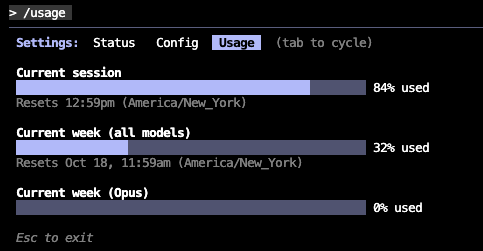
The first is usage tracking. There’s now a simple command (/usage) that shows how much I’ve used Claude Code—both per session and across the week. It sounds minor, but it’s a big deal if you use Claude as a daily coding or research companion. Before this, I had no sense of how close I was to hitting limits. Now, I can see usage at a glance and plan longer sessions without getting cut off mid-run. Claude Code Usage

This, along with knowing how close I am to auto-compaction, provides me with cues to write important details of this session into persistent storage (e.g., readme, Claude.md, etc.). I've seen a remarkable difference in context awareness with this workflow than leaving it to the default mode for Claude to figure out from scratch (at the beginning of a new session).

It also helps me notice patterns. I can tell which projects burn the most compute, how often I switch between tasks, and when it’s better to pause instead of letting Claude run continuously. It’s become part of my rhythm: check usage, decide the next task, move on.

The second change is thinking mode. Claude 4.5 improves how it handles extended reasoning. You can tell it to “think more” or allocate a higher thinking budget. Behind the scenes, the model spends extra cycles reasoning before it writes the final response. The benefit is noticeable in multi-step work—debugging, refactoring, or reasoning about trade-offs. It feels less like a reactive assistant and more like a deliberate collaborator.

I’ve started using this intentionally. When I want speed, I keep it in default mode. When I need depth—say, explaining a complex codebase or designing a system—I turn thinking mode on. The quality lift is visible, but so is the latency, so it’s worth tuning per task.

The combination of usage visibility and controllable thinking depth has made planning smoother. I know my remaining “compute budget” and can decide when to go deep or stay fast. It’s a small thing that adds up to better pacing, clearer expectations, and fewer broken sessions.

These tools make Claude feel more predictable and more transparent. That’s what I want from AI I rely on every day: not just intelligence, but awareness of time, limits, and effort.

The Strategy-Outcome Connection: Moving Beyond the Feature Roadmap

The loudest voice problem

If you’ve ever owned a roadmap, you’ve likely faced this.

A senior leader walks into your review and says, “We need to build this feature next quarter.” The statement carries weight. It comes from experience, hierarchy, and often, conviction.

You might even agree at first. Maybe you think, “Let’s build it once to gain trust.” Sometimes that’s a fair trade. But most times, that’s how the loudest voice in the room hijacks your strategy.

I’ve been there. It’s not easy. Saying no or even “not yet” to a powerful stakeholder can feel like career suicide. But the real danger is subtler: when you say yes without alignment, you silently accept a direction that dilutes focus and outcomes.

So what do you do? You learn to take the conversation up a level. Every time.

Not to argue, but to connect the dots. You move from what feature we should build to what outcome we’re trying to drive and why it matters. That shift changes everything. It builds trust, sharpens thinking, and reveals nuance that usually hides beneath the surface.

Strategy is not a list of features

Too often, teams equate a roadmap with a strategy. They are not the same thing.

A strategy is a framework for decision-making — it tells you how you’ll achieve your vision by focusing efforts in the right direction. It connects daily execution to company goals and user value.

A roadmap, on the other hand, is simply the sequence of bets you’re placing to realize that strategy. Without strategy, a roadmap is just a collection of features fighting for space.

I like to think of strategy as a cascade of clarity:

  • Vision — what the future looks like if we succeed.
  • Strategic Intents — the key outcomes we’ll pursue to get there.
  • Product Initiatives — the customer problems we’ll solve to advance those outcomes. [...]

The PM as Builder Era

The best product managers I know are not writing more specs. They are writing code.

AI is changing what it means to build, not by replacing PMs but by removing the constraints around what they can try. When the cost of testing an idea approaches zero, the right move is not to plan more. It is to prototype more.

Today, you can build five versions of a concept before lunch. You can wire up a workflow with an AI agent, simulate user inputs, and test outcomes in hours. There is no human bottleneck anymore. The constraint is clarity, knowing which five ideas are worth testing.

That is where the new PM discipline begins.

The AI era does not reward the teams with the biggest backlogs. It rewards those who learn fastest. But speed without intent only creates noise. If you point AI at a fuzzy problem, you will get fuzzy, generic answers. You still have to do your work: talk to users, observe pain points, and understand their real jobs-to-be-done. That is the human in the loop, and it is irreplaceable.

AI is getting cheaper by the week, but good judgment is not. The PM’s leverage now comes from pairing fast experimentation with deep context. You use AI to explore breadth, many paths quickly, then apply your product intuition to decide which one deserves depth.

The strongest PMs are not managing AI. They are building with it. They write prompts, stitch prototypes, and create quick tools that prove or disprove assumptions. They treat every output as a sketch, not a final draft.

The result is a new rhythm: small, shippable ideas that stack up fast. When you cut ceremony and keep humans focused on insight, not process, teams find a sustainable pace that feels both fast and calm.

AI may automate production, but it cannot automate purpose. The real product work, deciding what matters, why it is worth solving, and how to bring it to life, still starts and ends with people.

The PM as builder is not about doing everything yourself. It is about owning the craft of learning. You use AI to collapse the distance between idea and feedback, and in that loop, you rediscover what product management was always meant to be: building things that actually matter.